Blog

  • Steps to Build a Successful Mobile Application

    Steps to Build a Successful Mobile Application

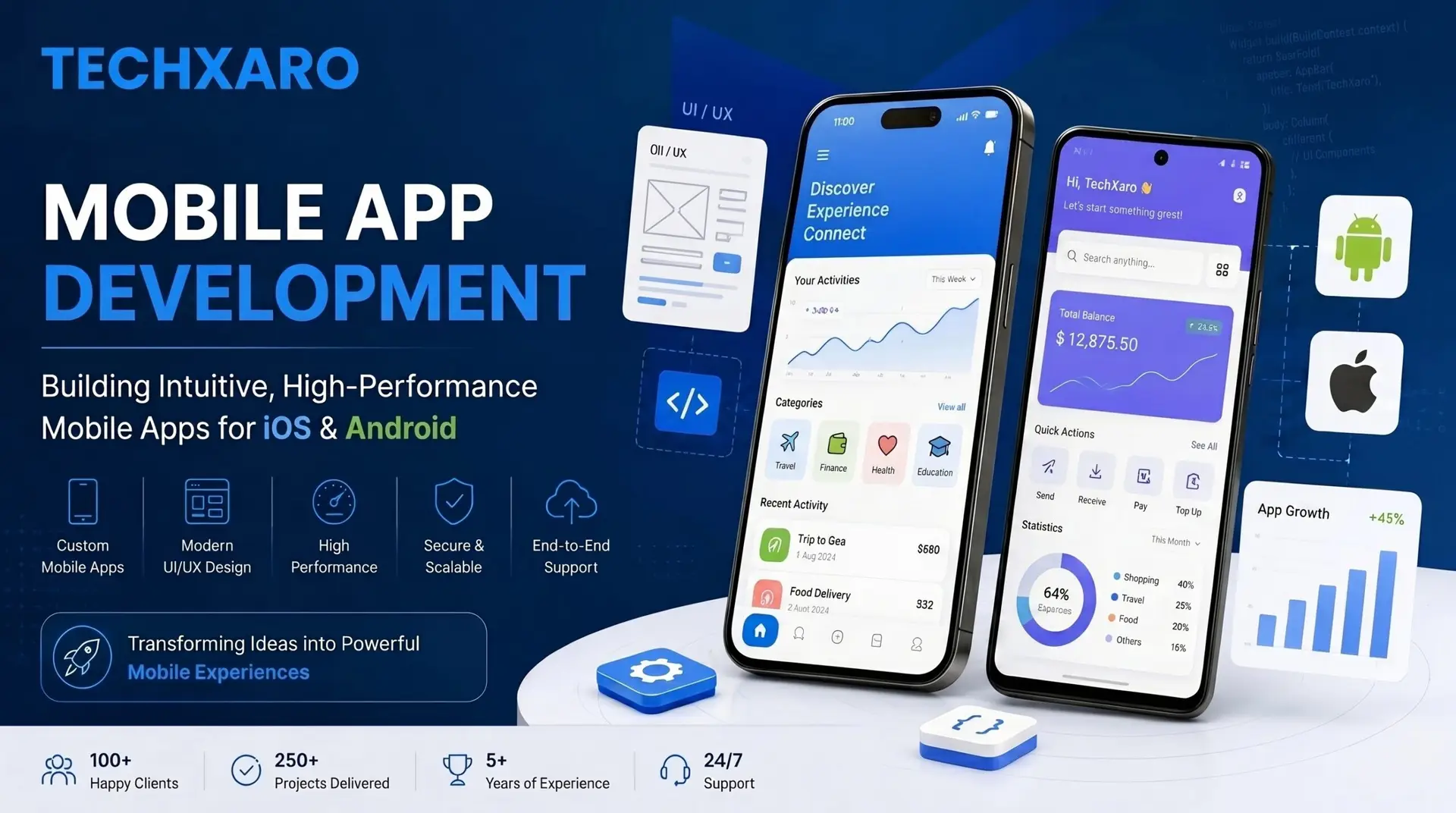
    Building a mobile app sounds exciting, and it is. But without a clear plan, most app ideas never make it past the idea stage. This blog exists for one reason: to give you a simple, honest roadmap for Mobile App Development so you can go from idea to a working app without wasting time or money. Whether you are a business owner, a startup founder, or someone exploring this space for the first time, these steps will help you understand exactly what goes into building an app that actually works.

    Is your website struggling to attract visitors and generate leads? Stop leaving your online visibility to chance. Let us build a data-backed blueprint that scales your customer acquisition.  Claim Your Free UX & SEO Audit to Uncover Hidden Drop-Off Points

    Why Mobile App Development Matters

    We are living in a mobile-first world and the numbers back that up. According to Statista, over 7.5 billion people use mobile devices worldwide. Google reports that more than 72% of all internet traffic now comes from mobile phones. The global app economy is projected to reach $935 billion by 2027, according to Mordor Intelligence. These are not just big numbers, they represent real customers who are spending more time on their phones than anywhere else. Businesses that show up on mobile connect with those customers directly.

    Step-by-Step Guide to Building a Successful Mobile App

    Building an app without a plan is like starting a road trip without a map. You might eventually get somewhere but it will cost you more time, more money, and a lot of frustration along the way. The steps below break the entire Mobile App Development process into simple, manageable stages. Follow them in order and you will always know where you are, what comes next, and why it matters.

    Step 1: Define Your Idea Clearly

    Every successful app starts with a clear idea not a vague one. Before you talk to any developer or designer, sit down and honestly answer three questions:

    • Problem: What problem does your app solve?
    • Audience: Who are your target users?
    • Goal: What do you want users to actually do inside the app?

    Most failed apps were built without clear answers to these questions. A focused idea leads to a focused product. A vague one leads to a bloated, confusing app that nobody uses.

    Step 2: Do Your Market Research

    Once you have your idea, go look at what already exists. Download two or three competitor apps. Use them as a real customer would. Read their reviews, not just the five-star ones, but the two- and three-star ones too. That is where the real feedback lives.

    Ask yourself: what are users complaining about? What features do they wish existed? What does the app do well that you could learn from? Your goal is not to copy what is already out there; it is to find the gap and fill it better.

    Step 3: Plan Your Features With an MVP

    One of the most common and costly mistakes in Mobile App Development is trying to build everything at once. Resist that urge. Instead, plan an MVP Minimum Viable Product. This is a lean version of your app that includes only the core features needed to solve the main problem.

    • Must-have features: The functions your app simply cannot work without
    • Nice-to-have features: Good ideas that can wait until after launch
    • Avoid: Anything that adds cost and time without adding real value to the user

    An MVP gets your app into real hands faster. And real users will tell you more in one week than you can figure out in months of planning alone.

    Step 4: Design the UI and UX

    A lot of people think design is about making things look nice. It is actually about making things work smoothly. There is a difference.

    UI (User Interface) is the visual layer of the colors, buttons, icons, fonts, and layout of every screen. UX (User Experience) is how the whole thing feels, how quickly a user can find what they need, how natural the flow feels, how little friction stands between them and completing a task. When crafting these interfaces, understanding why user-centered design matters in mobile app development is crucial for retention.

    Bad design is one of the top reasons users uninstall apps. You can have the best idea in the world, but if the app is confusing or slow to navigate, people will leave. Always test your designs with real people before development starts. Even showing a basic prototype to five friends can save you weeks of rework later. If you want to dive deeper into broader design concepts, explore why branding and creative design matter in business.

    Step 5: Choose the Right Platform

    This is a decision that affects your budget, timeline, and audience reach, so think it through carefully.

    Android gives you the widest reach. It dominates markets across South Asia, Africa, Southeast Asia, and most of the developing world. If your target audience is broad and global, Android is usually the starting point.

    iOS attracts a different kind of user. iPhone users in North America and Europe tend to spend more on apps and in-app purchases. If your business model depends on that kind of engagement, iOS should be your priority.

    Cross-platform development using Flutter or React Native is a smart middle ground for startups and small businesses. You build one codebase that runs on both Android and iOS, which saves time and cuts costs significantly without sacrificing too much on quality.

    There is no universally right answer here. It depends on who your users are and what your budget looks like.

    Step 6: Develop the App

    This is where the actual building happens. Development breaks down into three layers that all have to work together:

    • Frontend: Everything the user sees and touches, such as screens, buttons, animations, and transitions
    • Backend: The server, database, and logic running behind the scenes that the user never sees but always depends on
    • APIs: The connections that let your app talk to other services, payment systems, maps, social logins, and more

    The most reliable approach is agile development, building in short, focused stages called sprints, testing each piece before moving to the next. For businesses integrating retail elements, choosing the correct backend architectures or e-commerce solutions for your online business growth can set up a robust foundation.

    Step 7: Test the App Thoroughly

    Skipping testing is how good apps become bad reviews. Before your app goes anywhere near an app store, put it through proper testing:

    • Functional Testing: Does every feature work the way it should?
    • Performance Testing: Does it hold up when many users are on it at the same time?
    • Device Testing: Does it look and work correctly on different screen sizes and operating systems?
    • Security Testing: Is user data actually protected?

    Always test on real physical devices, not just simulators. Simulators are convenient, but they miss things that real devices catch. Your users will be on real devices, and your testing should reflect that.

    Step 8: Launch on the App Store

    Once testing is solid, it is time to go live. You will submit your app to the Google Play Store for Android users or the Apple App Store for iOS users, or both if you went cross-platform.

    Both platforms have a review process before your app goes public. Apple tends to be stricter. Make sure your app follows their guidelines around content, privacy, and performance, or you risk rejection and delays.

    Stop Chasing Clicks. Start Generating Customers. Ready to turn your website into a high-yielding lead-generation asset? Schedule a direct strategy session with TechXaro’s growth team today. We’ll diagnose your current traffic leaks and map out a clear path to measurable digital growth. Claim Your Free UX & SEO Audit to Uncover Hidden Drop-Off Points

    Native vs Cross-Platform: Quick Comparison

    Factor Native Cross-Platform
    Cost Higher Lower
    Performance Excellent Very Good
    Time to Build Longer Faster
    Maintenance Two codebases One codebase
    Best For Complex, high-performance apps Startups and MVPs

    FAQs

    How long does Mobile App Development take?

    A simple app typically takes 2 to 4 months. A more complex app with advanced features can take anywhere from 6 to 12 months, depending on team size, number of features, and the platforms involved. If you are looking to accelerate growth through alternative web avenues first, establishing a high-performing business website is an excellent parallel strategy.

    How much does it cost to build a mobile app?

    A basic app can start from $5,000. A feature-rich enterprise app can go well above $50,000. The right development partner helps you spend your budget where it actually matters. For growing brands, deploying a custom mobile app development service helps maximize long-term return on investment.

    Should I build for Android or iOS first?

    It depends on your audience. Android works better for broader global reach. iOS is the better choice if you are targeting premium users in North America or Europe.

    What is the difference between native and cross-platform development?

    Native apps are built separately for each platform and offer the best performance. Cross-platform apps share one codebase across Android and iOS, faster to build and more affordable, especially for startups.

    What is an MVP and why does it matter?

    An MVP is a lean first version of your app with only the essential features. It lets you launch fast, get real feedback, and improve without burning through your entire budget upfront.

    Conclusion

    Successful Mobile App Development is not about building something complex or impressive-looking. It is about solving a real problem in a way that feels simple and reliable to the people using it. Follow these steps from sharpening your idea all the way through to post-launch improvements and you give yourself a real chance at building something users actually stick with.

    If you are ready to get started, TechXaro offers complete Mobile App Development services UI/UX design, iOS and Android development, testing, and long-term support. Bring your idea and let the right team help you build it the right way. Additionally, keeping your mobile and desktop ecosystem running requires proper infrastructure, which highlights why maintenance and support matter for sustainable operational health.
    Get a Free App Development Cost Estimate

  • What Features Should I Look for in an Ecommerce Solution?

    What Features Should I Look for in an Ecommerce Solution?

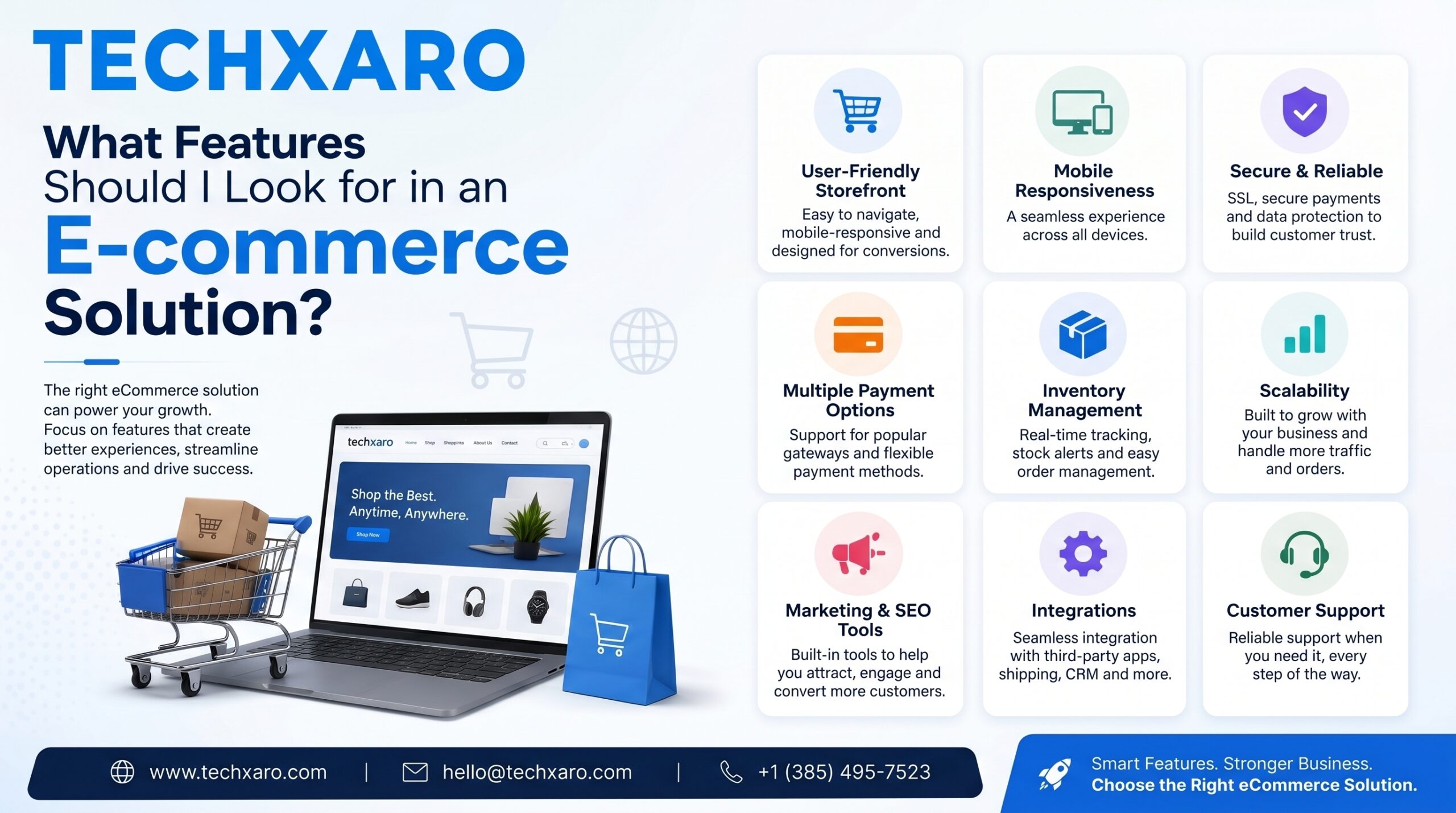
    If you want to sell products online, you need the right e-commerce solution. But with so many platforms available, it can be hard to know what really matters. This blog explains everything in simple words so you can make a smart choice before picking a platform. Whether you are just starting out or already running a business, these features will help you sell more and grow your store anywhere in the world.

    What is an e-commerce solution, and how does it work?

    An e-commerce solution is a software platform that lets you build and run an online store. It handles everything for you, showing your products, taking payments, managing orders, and keeping your store running smoothly. Think of it as your complete online shop in one place.

    Are you losing customers to a slow, confusing online checkout? Don’t let technical limitations hold your business back. Let us build a high-converting, custom digital store tailored to your brand. Claim Your Free UX & SEO Audit to Uncover Hidden Drop-Off Points

    Key Features to Look for in an E-commerce Solution

    Before you pick any platform, here are the 10 most important features you should always check.

    1. Easy-to-Use Store Builder

    What it means

    You should be able to set up your store without knowing how to code. A good platform gives you simple tools to add products, change your design, and manage your store easily.

    Why it matters

    Most business owners are not developers. A simple store builder saves you time and money so you can focus on selling.

    Look for

    Ready-made templates, drag-and-drop tools, and easy product upload options. A professionally built web design and development solution can also make your online store easier to manage and scale.

    2. Safe and Flexible Payments

    What it means

    Your store should accept payments from customers around the world credit cards, PayPal, Apple Pay, and local payment methods.

    Why it matters

    If a customer cannot pay the way they prefer, they will leave without buying. A good payment system keeps things smooth and secure.

    Look for

    SSL security, fraud protection, support for multiple currencies, and low transaction fees.

    Payment Type Used By Importance
    Credit / Debit Card Almost everyone Essential
    PayPal Global shoppers Very important
    Apple Pay / Google Pay Mobile users Important
    Local payment methods Region-specific buyers Depends on market
    Buy now, pay later Younger shoppers Growing fast

    3. Mobile-Friendly Design

    What it means

    Your store should work well and look good on phones and tablets, not just on a computer screen.

    Why it matters

    More than 60% of online shopping now happens on mobile. If your store is hard to use on a phone, you lose customers.

    Look for

    Responsive themes, fast loading on mobile, and a smooth mobile checkout. A high-performing business website helps improve customer engagement and sales.

    4. Inventory and Order Management

    What it means

    The platform should help you keep track of your products and manage customer orders without doing everything manually.

    Why it matters

    Running out of stock or losing track of orders leads to unhappy customers and lost money.

    Look for

    Low-stock alerts, automatic order tracking, easy returns handling, and the ability to manage multiple locations if needed.

    Turn Browsing Traffic Into Verifiable Retail Revenue. From seamless third-party ERP integrations to conversion-optimized single-page checkouts, TechXaro engineers high-performance web stores designed to maximize average order value (AOV). Explore TechXaro’s Full Suite of E-Commerce Services

    5. SEO and Marketing Tools

    What it means

    Built-in tools that help your store show up on Google and reach more customers through email, social media, and ads.

    Why it matters

    Getting people to visit your store is just as important as having a nice store. Without visibility, no one finds you.

    Look for

    Custom URLs, meta descriptions, email marketing, discount codes, and social media integration. Strong SEO and digital marketing services can help increase your store traffic and conversions.

    6. Shipping and Delivery Options

    What it means

    Your platform should connect with shipping providers and let you offer clear delivery choices to customers worldwide.

    Why it matters

    Expensive or slow shipping is one of the top reasons people leave without buying. Clear shipping options build trust.

    Look for

    Real-time shipping rates, support for major carriers like FedEx, DHL, and UPS, and the ability to offer free shipping.

    7. Security and Data Protection

    What it means

    Your store and your customers’ personal information must stay protected at all times.

    Why it matters

    One data breach can destroy customer trust for good. Security is never optional.

    Look for

    SSL certificate, PCI-DSS compliance, two-factor login, regular backups, and GDPR tools if you sell in Europe. Reliable website maintenance and support services can help keep your store secure and updated.

    8. Analytics and Reports

    What it means

    You should be able to see how your store is doing, what sells well, where visitors come from, and where people stop and leave.

    Why it matters

    You cannot improve what you cannot measure. Good data helps you make better decisions every day.

    Look for

    Sales reports, traffic data, conversion rates, and customer behavior tracking.

    9. Customer Support Features

    What it means

    Tools that make it easy for customers to get help when they need it and easy for you to manage those conversations.

    Why it matters

    Happy customers come back. Fast and friendly support turns a bad experience into a good one.

    Look for

    Live chat, helpdesk tools, easy returns and refunds, and customer review options.

    10. Can It Grow with Your Business?

    What it means

    The platform should handle more products, more traffic, and more orders as your business gets bigger without slowing down or crashing.

    Why it matters

    Switching platforms later is painful and expensive. Pick one that can grow with you from the start.

    Look for

    Flexible pricing plans, no product limits, and reliable uptime of 99.9% or better.

    Feature Small Store Growing Business
    Products Up to 100 Unlimited
    Monthly visitors Under 10,000 100,000+
    Staff accounts 1–2 5 or more
    Multi-language support Not needed Very important
    API access Optional Essential

    Stop Battling Fragmented Templates. Build a Brand Asset.

    Ready to eliminate cart abandonment and scale your monthly sales numbers? Schedule a direct evaluation call with TechXaro’s development strategists today. We will map out your operational requirements and build a scalable digital storefront engineered to convert.

    Schedule Your Free E-Commerce Strategy Session with TechXaro

    Frequently Asked Questions

    How much does an e-commerce platform cost?

    Costs vary. Basic plans usually start around $20 to $30 per month. As your business grows, you may pay more for extra features but the right platform pays for itself through more sales.

    Can I sell to customers in other countries?

    Yes. Most good platforms support multiple currencies, languages, and international shipping. Just make sure your chosen platform has these features before you sign up.

    Do I need coding skills to run an online store?

    No. Most modern platforms are built for everyday users. You can set up your store, add products, and manage orders without writing any code at all. Learning about website development basics can still help you make smarter decisions for your store.

    What is the most important feature to look for?

    Security and ease of use are the top two. If customers do not feel safe paying, they will leave. And if the platform is too hard to manage, you will waste a lot of time.

    How do I know if a platform can grow with my business?

    Check if it offers flexible plans, no product limits, and strong uptime. Reading reviews from businesses similar to yours is also a great way to find out.

    Is it hard to switch platforms later?

    Yes, switching platforms can be difficult and time-consuming. That is why it is important to choose the right one from the beginning. Think about your future needs, not just where you are today.

    Conclusion

    Choosing the right ecommerce solution is one of the most important decisions you will make for your online business. The right platform makes it easy to sell, manage orders, accept payments, and grow all in one place.

    Focus on the features that matter most: a simple store builder, safe payments, mobile-friendly design, good security, and the ability to grow with your business. Do not get distracted by fancy extras until the basics are solid.

    At Techxaro, we help businesses around the world find and set up the right ecommerce solution so you can stop worrying about technology and start focusing on what really matters: growing your business.

    Take your time, compare your options, and choose a platform that fits your goals today and tomorrow.

    Claim Your Free UX & SEO Audit to Uncover Hidden Drop-Off Points

  • Why Branding and Creative Design Matters in Business

    Why Branding and Creative Design Matters in Business

    In today’s world, there are thousands of businesses competing online. So how do people decide who to trust and who to buy from? Most of the time, the answer is branding and creative design. The way your business looks and feels tells people a lot about you even before they read a single word. This article will explain why branding and creative design are so important for any business, and how you can use them to grow.

    Does your current brand identity look as professional as the services you deliver? Stop losing premium leads to competitors with better graphics. Let us build an authoritative, cohesive visual asset that stands out. Claim Your Free Brand Identity & Creative Audit Today

    What Is Branding and Creative Design?

    Branding: This is your business identity. It includes your name, your values, the way you talk to customers, and the promise you make to them.

    Creative design: This is how your brand looks. It includes your logo, colors, fonts, website design, and every image your customers see.

    Together, they answer one simple question every customer asks: “Why should I trust you and not someone else?” Businesses that combine strong visuals with a professional web design and development strategy often create stronger customer trust online.

    The Difference Between a Logo and a Brand

    A logo is just a symbol. A brand is everything every feeling, every memory, and every experience a customer has with your business. Creative design is what connects the two. It turns your brand values into something people can actually see and feel.

    If your business is planning a complete online transformation, this guide on website redesign strategies can help protect your existing audience while upgrading your brand experience.

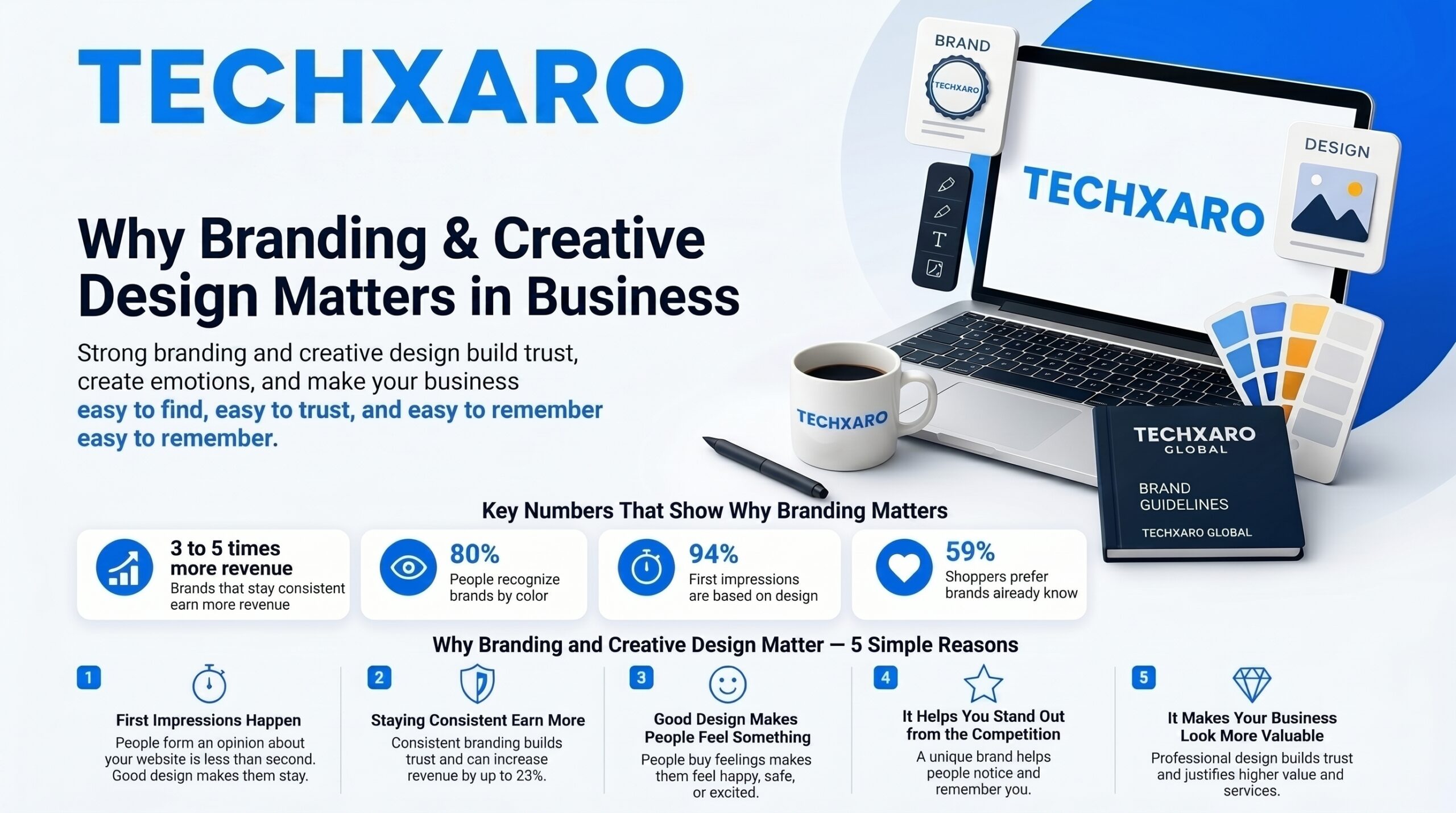
    Key Numbers That Show Why Branding Matters

    The facts below show how powerful good branding and design can be for any business around the world.

    Fact Number
    Brands that stay consistent earn more revenue 3 to 5 times more
    People who recognize brands by color 80%
    First impressions that are based on design 94%
    Shoppers who prefer brands they already know 59%

    Why Branding and Creative Design Matter 5 Simple Reasons

    1. First Impressions Happen in Seconds

    Research shows that people form an opinion about your website in less than one second. If your design looks old or messy, people will leave right away. A clean and professional design makes people want to stay and learn more about you.

    Businesses with strong visual presentation often improve conversions by combining branding with SEO and digital marketing strategies that increase targeted traffic.

    2. Staying Consistent Helps You Earn More

    When your brand looks the same on your website, your emails, and your social media, people feel they can trust you. Businesses that keep their branding the same everywhere can earn up to 23% more revenue. It is a small habit that makes a big difference.

    Consistent visuals also improve performance across SEO and digital marketing campaigns by making your business more recognizable online.

    3. Good Design Makes People Feel Something

    People do not just buy products. They buy feelings. The right colors, images, and design style make your audience feel happy, safe, or excited. When your brand creates a good feeling, people keep coming back and they tell their friends about you too.

    Many companies improve emotional connection through strong user centered design experiences across websites and mobile applications.

    4. It Helps You Stand Out from the Competition

    There are many businesses online that look exactly the same. A strong and unique brand identity makes people notice you and remember you. When someone can spot your brand quickly, they are much more likely to choose you over someone they do not recognize.

    A professionally designed website combined with modern website development can help create a more memorable customer experience.

    5. It Makes Your Business Look More Valuable

    When a business looks polished and professional, people naturally trust it more. Good creative design also makes people feel like they are getting something premium which means they are often willing to pay more for your product or service.

    Businesses that invest in strong visual branding often pair it with SEO and digital marketing to increase visibility and perceived authority.

    🎨 Stop Blending In. Build a Distinguishable Market Authority. From comprehensive brand style guides and custom iconographies to conversion focused UI UX assets, TechXaro bridges the gap between high level creative artistry and measurable business metrics. 👉 Claim Your Free Brand Positioning & Design Strategy Session

    Branding vs. Creative Design What Is the Difference?

    Area Branding Creative Design
    What it is Your identity and message How that identity looks
    What it includes Values, voice, mission Logo, colors, fonts, website
    Main goal Build trust and recognition Attract and communicate visually
    How long it lasts Long term asset Updated regularly
    How you measure it Customer loyalty and reputation Clicks, traffic, and sales
    Who handles it Leadership and marketing team Design and product team

    How to Build a Strong Brand with Creative Design

    Step 1: Get Clear on Who You Are

    Before you design anything, answer these simple questions. What problem do you solve? Who are your customers? What do you want people to say about your business? These answers will guide every design decision you make.

    Step 2: Build Your Visual Identity

    Your visual identity is more than just a logo. It includes your brand colors, your fonts, the style of your images, and the way everything looks together. Write all of this down in a simple brand guide so your whole team follows the same rules.

    Companies building scalable online brands often combine visual identity with ecommerce solutions that create a seamless customer experience.

    Step 3: Use It the Same Way Everywhere

    From your website to your emails to your social media posts everything should look and feel like it belongs to the same brand. The more consistent you are, the faster people will recognize and remember you.

    Step 4: Update It Every Few Years

    You do not need to change your brand every year. But a small visual refresh every 5 to 7 years keeps your brand looking modern. The key is to stay fresh without losing the recognition you have already built.

    Businesses planning a modern refresh can review this complete digital transformation strategy guide to align branding with long term growth.

    At Techxaro, we help software companies around the world turn their vision into a brand identity and creative design system that works and grows with their business.

    🚀 Stop Settling for Outdated Visuals. Own Your Space.

    Ready to transform how the market perceives your business? Schedule a direct visual evaluation session with TechXaro’s lead designers today. We’ll isolate your brand’s style gaps and construct an execution framework engineered to convert.

    👉 Book Your Free Creative Branding Consultation

    Frequently Asked Questions

    What is the difference between branding and marketing?

    Branding is who you are. Marketing is how you tell people about it. Your brand stays the same for a long time. Your marketing changes depending on what you want to promote. You need a strong brand first before your marketing can work properly.

    How much should a business spend on creative design?

    Most growing businesses spend between 5 and 15 percent of their yearly revenue on branding and design. Even starting small with a good logo, a clean website, and a simple brand guide can make a big difference in how people see your business.

    Can small businesses benefit from branding?

    Absolutely. In fact, a clear and consistent brand helps small businesses look just as professional as big companies. It builds trust quickly and helps you win customers even if your budget is small.

    How does creative design affect customer trust?

    When your design looks clean and professional, people trust you right away. When it looks messy or outdated, people assume your product is also low quality even if it is not. Design is usually the first thing a customer judges.

    How often should a business refresh its brand design?

    A small visual update every 5 to 7 years is usually enough to keep your brand looking fresh. A full rebrand is only needed if your business changes direction completely or goes through something major like a merger.

    What are the key parts of a good creative design system?

    The most important parts are your color palette, your fonts, your logo with usage rules, your image style, and a simple brand guide that explains how to use all of these together. Once you have this, your whole team can keep everything looking consistent every day.

    Final Thoughts

    Branding and creative design are not just about looking good. They are about making people feel confident enough to choose you. A clear brand and a good design make your business easy to find, easy to trust, and easy to remember. Whether you are just starting out or already growing globally, the businesses that invest in how they look and feel are the ones that grow faster and last longer.

    If you want to strengthen your online visibility even further, explore our search engine optimization strategies to support long term business growth.


    Claim Your Free Brand Identity & Creative Audit Today

  • How to Choose a Web Designer and Developer for Small Businesses

    How to Choose a Web Designer and Developer for Small Businesses

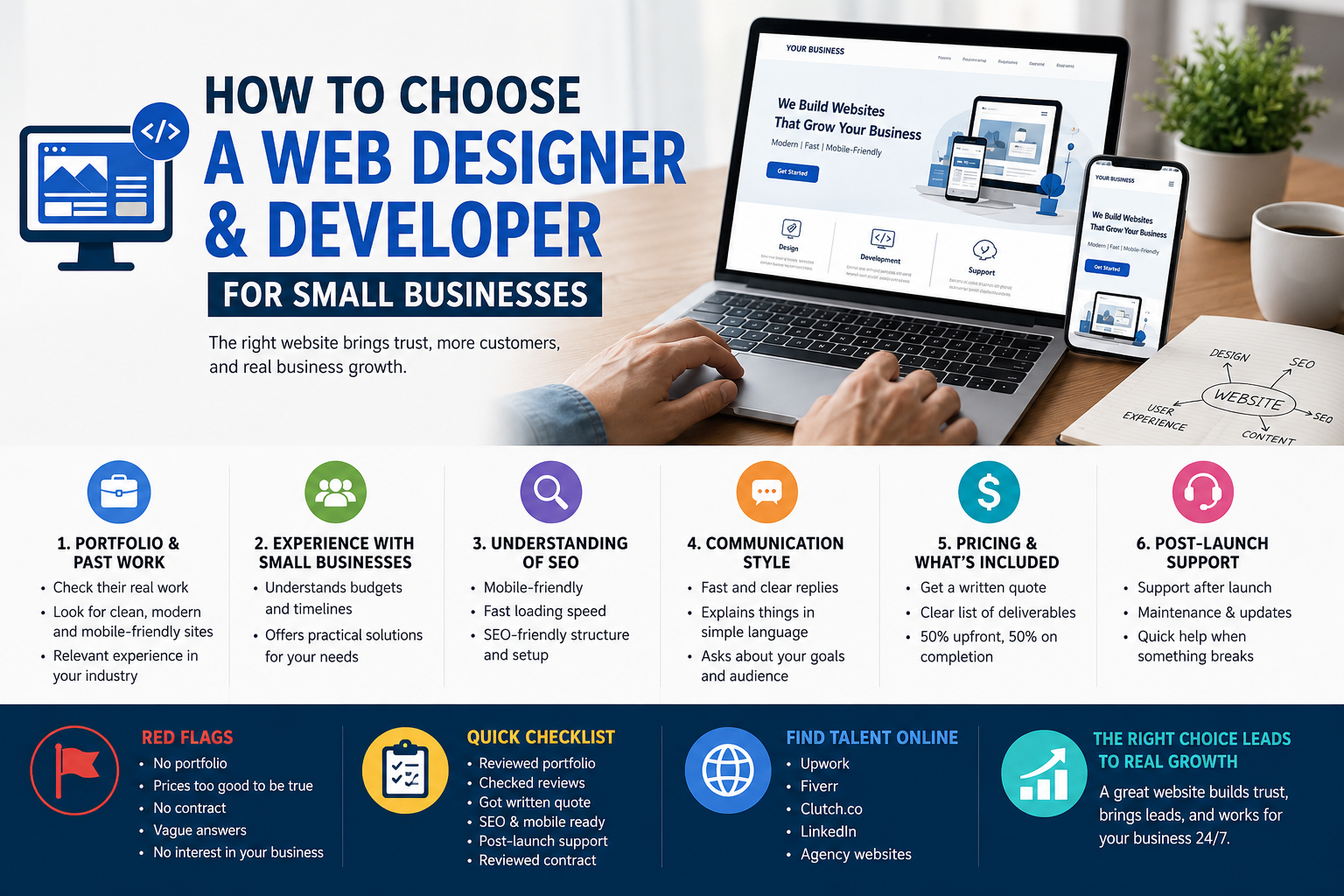
    Finding the right company for web design and development is not easy, especially when you have a limited budget, no technical background, and too many options to choose from. Most small business owners either overpay, pick the wrong person, or end up with a website that does not bring any results. This article will help you avoid all of that. You will learn exactly what to look for, what questions to ask, and how to make the right choice whether you are hiring locally or working with someone online from anywhere in the world.

    Don’t risk your brand with amateur design. Skip the guesswork and partner with certified experts who build high-performance, secure, and custom digital storefronts. Claim Your Free Website Strategy & UX Consultation Today

    Why Web Design and Development Matters for Small Businesses

    Most customers today search online before they buy anything. If your website looks unprofessional, loads slowly, or is hard to use on a phone they will leave and go to your competitor. A well-built website builds trust, brings in leads, and works for your business 24 hours a day.

    These numbers show one clear thing: your website is not optional. It is your most important marketing tool.

    Web Designer vs Web Developer Know the Difference

    Web Designer: Focuses on how the website looks layout, colours, fonts, and overall feel.

    Web Developer: Focuses on how the website works the code behind buttons, forms, and page speed.

    Full-Stack Professional: Handles both design and development. For most small businesses, this is the most practical and affordable option.

    Role Main Job Best For
    Web Designer Visual appearance Branding, look and feel
    Web Developer Coding and functionality Features, speed, security
    Full-Stack Both design and code Small businesses, tight budgets

    Key Factors to Consider When Choosing a Web Professional

    1. Portfolio and Past Work

    What to look for: Always ask to see real examples of websites they have built before. A strong portfolio shows their skills, style, and experience.

    • Do the sites look clean and modern?
    • Do they load fast on both desktop and mobile?
    • Have they worked with businesses in your industry?
    • Are the sites easy to navigate?

    If a professional cannot show you at least 3 to 5 real examples, that is a red flag.

    2. Experience With Small Businesses

    Why it matters: Small businesses have tighter budgets, faster timelines, and simpler needs. A professional who understands this will give you better value and a smoother experience.

    3. Understanding of SEO

    Bold point: A beautiful website that nobody can find on Google is useless.

    Your web professional should understand basic SEO Search Engine Optimisation. Ask:

    • Will the site be mobile-friendly?
    • Will page speed be optimized?
    • Will you set up basic meta titles and descriptions?
    • Will the site structure be search-engine friendly?

    You can also learn more about search engine optimization and how it improves visibility for business websites.

    Need a clear roadmap for your business website? Get a free, zero-obligation technical consultation and a tailored wireframe strategy from our senior architects. Claim Your Free Website Planning & SEO Audit

    4. Communication Style

    Simple rule: If they are hard to reach before the project starts, they will be impossible to reach once it does.

    Pay attention to:

    • How fast do they reply to your first message?
    • Do they explain things in plain language?
    • Do they ask questions about your business and goals?

    Good communication is not a bonus, it is essential.

    5. Pricing and What Is Included

    Pricing for web design and development varies depending on the scope of your project, the features you need, and the team you choose to work with. Before you commit, always ask for a detailed proposal that clearly lists what is included, number of pages, design revisions, hosting setup, SEO basics, and post-launch support.

    Project Type Price Range (USD) What Is Included
    Starter Website $500 – $1,500 Up to 5 pages, basic design, contact form
    Business Website $1,500 – $5,000 Up to 10 pages, custom design, SEO setup, mobile-friendly
    Advanced Website $5,000 – $15,000 Custom features, e-commerce, integrations, full SEO
    Enterprise Website $15,000+ Complex systems, large-scale design, ongoing support

    Important: A higher price does not always mean better quality. Focus on what is included in the package, the team’s past work, and whether they understand your business goals not just the number on the invoice.

    6. Post-Launch Support

    What most people forget to ask: What happens after the website goes live?

    Ask:

    • Do you offer a support period after launch?
    • What does ongoing maintenance cost?
    • How do I reach you if something breaks?

    A professional who offers clear post-launch support is worth far more than one who disappears the day the site goes live.

    You can also explore why website maintenance and support matter for long-term business growth.

    Red Flags to Watch Out For

    No portfolio: They cannot show you any real work they have done.

    Prices too good to be true: Extremely low quotes almost always mean low quality or hidden fees later.

    No contract: Always insist on a written agreement before work begins.

    Vague answers: If they cannot explain their process in simple words, that is a problem.

    No questions about your business: A good professional always wants to understand your goals and industry.

    Pressure to decide immediately: Rushing you into a decision is never a good sign.

    Where to Find Reliable Web Professionals Online

    Since web design and development services are fully available online, you are not limited to your local area. You can find skilled professionals through:

    • Upwork Large pool of freelancers with verified reviews
    • Fiverr Good for smaller, defined projects
    • Clutch.com Verified agency reviews and rankings
    • LinkedIn Professional profiles with work history

    Before hiring, it also helps to review a detailed guide to building a high-performing business website so you understand the standards your project should meet.

    FAQs

    How much should a small business spend on a website?

    A basic small business website typically costs between $1,000 and $5,000 when hiring an experienced freelancer. Agencies charge more usually $3,000 to $15,000. Always get multiple quotes and compare what is included, not just the price.

    How long does it take to build a small business website?

    A simple 5 to 8 page website usually takes 3 to 6 weeks. A more complex site with an online store or booking system can take 8 to 16 weeks. The timeline also depends on how quickly you provide content like text and images.

    Can I hire a web professional from another country?

    Yes. Web design and development is a fully online service. Many small businesses worldwide hire remote professionals through Upwork or Fiverr and get excellent results. Just make sure they have strong reviews, clear communication, and a solid portfolio.

    What should be included in a web design contract?

    A proper contract should include: scope of work, number of pages, number of revisions, payment terms, project timeline, ownership of files, and cancellation terms. Never start without a signed agreement.

    How do I know if my web professional is doing a good job?

    Ask for regular updates at least once a week. They should share progress through screenshots or staging links so you can give feedback early and avoid surprises at the end.

    Conclusion

    Choosing the right company for web design and development does not have to be hard. Check their past work, read their reviews, ask the right questions, and get everything in writing before you start.

    Do not only focus on price. Focus on quality, communication, and someone who truly understands your business needs.

    Your website works for your business every single day all around the world. Make sure the right company builds it. When you are ready, Techxaro is here to help your small business grow online.

    Ready to Transform Your Digital Presence?

    Stop losing potential customers to slow, outdated layouts. Let’s build a fast, responsive, and SEO-optimized website that consistently converts visitors into paying customers.

    Claim Your Free Website Conversion & UX Audit Today

  • Why User-Centered Design Matters in Mobile App Development

    Why User-Centered Design Matters in Mobile App Development

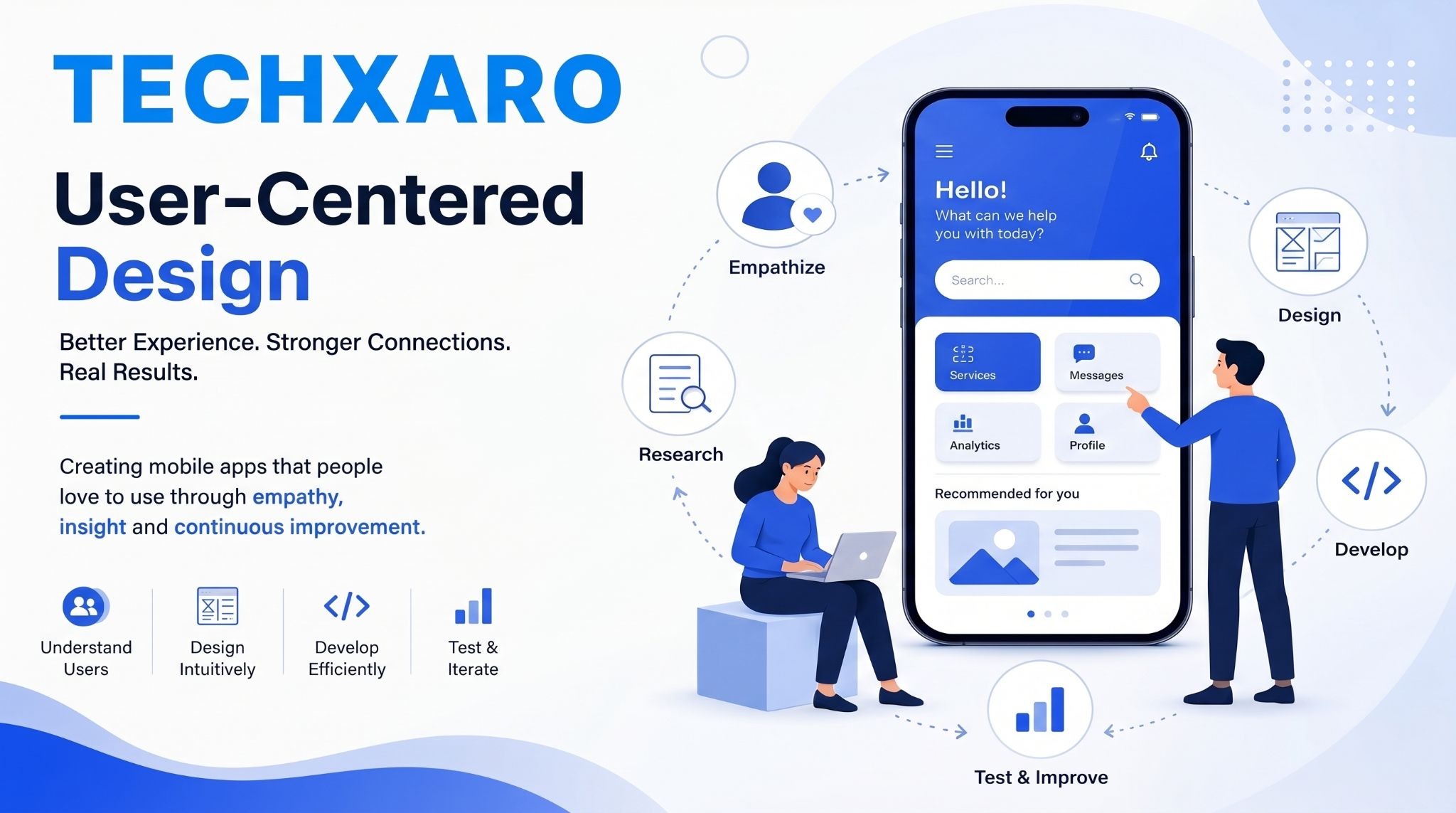
    In the world of Mobile App Development, building an app that functions well is only half the battle. The other half, and arguably the more important half, is building an app that people actually enjoy using. User-centered design is the philosophy that places the needs, behaviors, and expectations of real users at the heart of every design and development decision. This blog explores why user-centered design is not just a design trend but a fundamental approach that determines whether a mobile app succeeds or gets abandoned.

    Don’t let your app build be a shot in the dark. Partner with design engineers who place user psychology and seamless UI/UX at the core of your product. Launch Your High-Converting App with TechXaro’s Mobile App Development Experts

    What is User-Centered Design?

    User centered design (UCD) is an approach to building digital products where the end user’s needs, goals, and limitations are prioritized throughout the entire development process, from the initial concept all the way through to post launch improvements.

    Core principles of user centered design:

    • Empathy: Understanding users deeply before making design decisions
    • Iteration: Continuously testing, learning, and improving based on real feedback
    • Clarity: Designing interfaces that are intuitive and easy to navigate
    • Accessibility: Ensuring the product works for users of all abilities and backgrounds
    • Consistency: Delivering a predictable, reliable experience across all screens and interactions

    Why User Centered Design Is Critical in Mobile App Development

    The Stakes Are High in a Crowded Market

    The global app market is more competitive than ever. Millions of apps are available across major platforms, and users have very little patience for poor experiences.

    Global Mobile App Development stats that tell the story:

    Stat Figure
    Total apps available on Google Play (2024) Over 3.5 million
    Total apps available on Apple App Store (2024) Over 1.8 million
    Average time before a user abandons a slow app 3 seconds
    Users who uninstall apps due to poor UX 88%
    Increase in conversions with good UX design Up to 400%
    Businesses reporting better retention with UCD Over 70%

    The Cost of Ignoring User Experience

    Many businesses make the mistake of treating design as an afterthought in Mobile App Development, something to be polished after the core features are built. This approach consistently leads to costly problems down the line.

    Have a groundbreaking app idea but don’t know where to start? Get an expert breakdown of your app architecture, user flow map, and a transparent cost estimate completely free. Claim Your Free Mobile App Strategy Session with TechXaro

    What happens when user experience is ignored:

    • High uninstall rates: Users delete apps that confuse or frustrate them within minutes
    • Negative reviews: Poor experiences are shared publicly and damage brand reputation
    • Low engagement: Without an intuitive design, users do not explore the app’s full value
    • Increased support costs: Confusing interfaces generate more customer service requests
    • Wasted development budget: Fixing UX problems after launch costs significantly more than designing right from the start

    Key Elements of User-Centered Design in Mobile Apps

    Intuitive Navigation Making It Effortless

    If a user has to think too hard about how to use an app, the design has already failed. Navigation should feel natural and require minimal effort. Users should be able to find what they need within one or two taps without confusion.

    Principles of intuitive mobile navigation:

    • Familiar patterns: Use navigation structures users already know and expect
    • Clear labeling: Every button and menu item should communicate its purpose instantly
    • Minimal steps: Reduce the number of actions needed to complete any task
    • Visual hierarchy: Guide the user’s eye to the most important elements first

    Performance and Speed Design Goes Beyond Visuals

    User-centered design is not just about how an app looks it is about how it performs. A beautifully designed app that loads slowly or crashes frequently will lose users just as quickly as an ugly one.

    Performance benchmarks users expect:

    Performance Factor User Expectation
    App load time Under 2 seconds
    Screen transition speed Instant or near instant
    Crash frequency Zero tolerance for regular crashes
    Offline functionality Available where possible
    Battery and data usage Minimal drain on device resources

    Accessibility Designing for Everyone

    A truly user-centered app works for all users, not just the majority. Accessibility in Mobile App Development means ensuring that people with visual, hearing, motor, or cognitive differences can use the app without barriers.

    Accessibility features that matter:

    • Text scaling: Supporting larger font sizes for users with visual impairments
    • Color contrast: Ensuring text and elements are readable for color blind users
    • Screen reader compatibility: Making the app fully navigable through assistive technology
    • Simple language: Using clear, plain language that is easy for all users to understand

    Continuous Testing and Iteration

    User-centered design is never truly finished. The most successful apps in the world are constantly evolving based on how real users interact with them. Testing is not a one-time event it is an ongoing commitment.

    Types of testing used in user-centered mobile app development:

    • Usability testing: Watching real users navigate the app to identify friction points
    • A/B testing: Comparing two versions of a feature to see which performs better
    • Beta testing: Releasing early versions to a limited audience for real-world feedback
    • Analytics review: Using data to understand where users drop off or disengage

    The Business Case for User-Centered Design

    Investing in user-centered design is not just the right thing to do for users; it is a smart business decision with measurable returns.

    Business benefits of user-centered mobile app development:

    • Higher retention rates: Users who enjoy an app keep coming back, reducing the need for constant acquisition spending
    • Better reviews and ratings: Positive app store ratings drive organic downloads without additional marketing costs
    • Increased revenue: Smooth, intuitive experiences make users more likely to complete purchases or upgrades
    • Stronger brand loyalty: When users feel understood, they trust the brand behind the product

    Techxaro Building Apps With the User at the Center

    At Techxaro, user-centered design is not an optional feature it is built into every stage of the Mobile App Development process. From initial discovery and research through to launch and ongoing improvement, the focus remains on creating digital experiences that genuinely serve the people using them. For businesses across the globe looking to invest in mobile solutions that actually work, starting with the user is always the right place to begin.

    What Businesses Should Prioritise Before Building an App

    Before beginning any Mobile App Development project, businesses should ensure the following foundations are in place:

    • Defined user personas: Who exactly is this app being built for?
    • Clear user goals: What does the user need to accomplish within the app?
    • Competitive research: What are similar apps doing well, and where are the gaps?
    • Accessibility standards: Is the app being designed for all users from the start?

    Stop bleeding users to clunky interfaces and complicated setups. Let’s create a fast, stunning, and highly engaging mobile product that your customers will love to use every single day.

    👉 Get a Custom Quote and Build Your Mobile App with TechXaro Today

    FAQs

    Q1. What is user centered design in Mobile App Development?

    User centered design in Mobile App Development is an approach that prioritizes the needs, behaviors, and expectations of real users throughout the entire design and development process. Rather than building features based on assumptions, teams conduct research, test with real users, and continuously refine the product to ensure it genuinely serves the people using it.

    Q2. Why do so many apps fail despite having good features?

    Many apps fail not because of poor functionality but because of poor user experience. If an app is difficult to navigate, slow to load, or confusing in its layout, users will abandon it regardless of how useful its features might be. User centered design addresses this by ensuring the experience is just as strong as the functionality.

    Q3. How does user centered design affect app retention rates?

    Apps designed with the user in mind consistently achieve higher retention rates. When users find an app intuitive, fast, and genuinely helpful, they return to it regularly. Research consistently shows that improving UX can increase retention by a significant margin, reducing the cost of re acquiring lapsed users.

    Q4. Is user centered design only relevant for large apps?

    Not at all. User centered design is equally important for small and simple apps. In fact, for businesses with limited budgets, getting the user experience right from the start is even more critical because there is less room to absorb the cost of post launch redesigns.

    Q5. How long does user research take in the app development process?

    The time required for user research depends on the complexity of the project. For most business apps, an initial research phase of two to four weeks is sufficient to gather meaningful insights. However, user research is not a one time activity it should continue throughout the life of the product through testing and feedback collection.

    Conclusion

    User centered design is not a luxury reserved for the world’s biggest tech companies. It is a fundamental approach that any business investing in Mobile App Development at any scale should embrace from day one. When users feel understood, respected, and well served by a digital product, they engage more, stay longer, and trust the brand behind it more deeply. In a global market where competition is fierce and user patience is limited, putting people at the center of the design process is one of the smartest investments a business can make.

  • Why Maintenance and Support Matter for Websites

    Why Maintenance and Support Matter for Websites

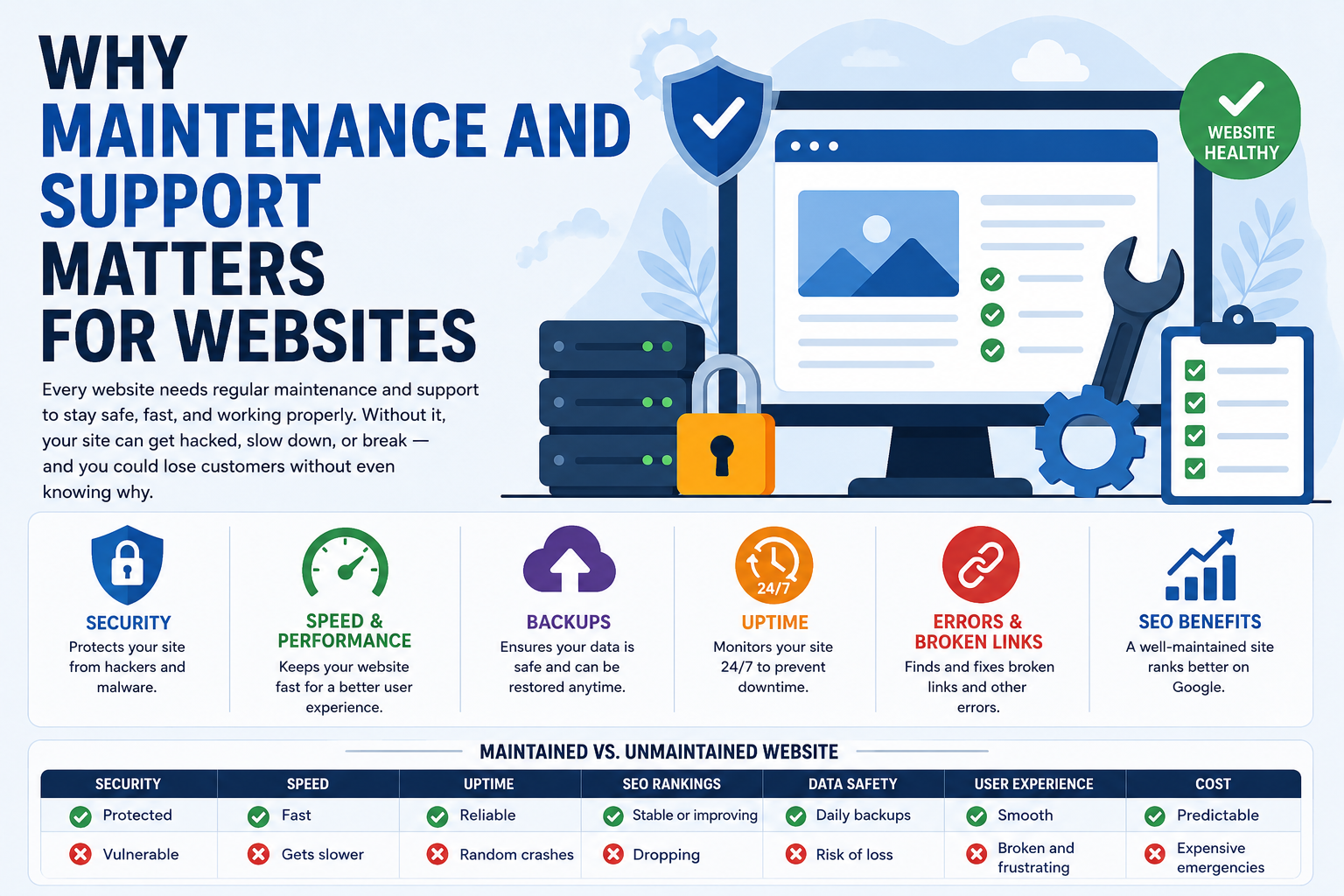
    Every website needs regular maintenance and support to stay safe, fast, and working properly. Without it, your site can get hacked, slow down, or break, and you could lose customers without even knowing why. Think of your website like a physical store. You would not leave your shop unlocked at night, let the lights flicker, or ignore a leaking roof. Your website deserves the same level of attention and care. This article explains why maintenance and support is so important, what they actually include, and what every website owner around the world should know before it is too late.

    Don’t wait for your website to crash to fix it. Protect your data, boost your speed, and ensure 99.9% uptime with our dedicated technical team. Explore TechXaro’s Professional Website Maintenance & Support Services Now!

    What Is Website Maintenance and Support?

    Website maintenance and support means taking care of your website on a regular basis after it goes live. This includes updating software, fixing errors, checking security, backing up your data, and making sure everything runs smoothly for every visitor who lands on your site.

    It is not a one-time job. It is not something you do once a year. It is an ongoing process that happens in the background every single day, quietly protecting your business, your reputation, and your revenue.

    To better understand how websites are built before maintenance begins, read what website development actually includes and why long-term technical support matters.

    Why Does Your Website Need Regular Maintenance?

    Security

    Hackers attack thousands of websites every single day across the globe. They do not only go after big corporations. Small and medium-sized businesses are actually targeted more often because they are less likely to have strong security in place. If your website software, plugins, or themes are not regularly updated, they develop vulnerabilities and hackers know exactly how to find and exploit them.

    Businesses that combine secure maintenance with professional web design and development services reduce the risk of major security failures significantly.

    Speed and Performance

    A slow website is a business problem, not just a technical one. Studies consistently show that visitors leave a page if it takes more than three seconds to load. Every extra second of delay reduces conversions, increases bounce rates, and sends a negative signal to Google.

    Over time, databases collect unnecessary data, old files pile up, and caching systems become outdated. Without regular performance maintenance, your website gradually slows down even if nothing obviously breaks. Routine cleanups, image optimization, and server configuration keep your site running at the speed your visitors and search engines expect.

    If your website already feels outdated or underperforming, review this complete website redesign guide to improve speed, UX, and conversions.

    Backups

    Imagine waking up one morning to find your entire website gone. No content, no product pages, no customer data. This is not a hypothetical scenario; it happens to real businesses every day due to server failures, ransomware attacks, or accidental deletions.

    A proper backup system means that even in the worst-case scenario, your entire website can be restored within minutes. Without regular automated backups stored securely off-site, a single incident can permanently wipe out everything you have built.

    Uptime Monitoring

    Every minute your website is offline, you are losing potential customers and real revenue. For businesses serving global audiences across different time zones, downtime at any hour is costly. Uptime monitoring means someone or something is watching your website around the clock, every single day. The moment an issue is detected, your technical team is alerted and the problem is fixed before most of your visitors even notice.

    Broken Links and Errors

    Links break over time. Pages get moved, deleted, or renamed. When visitors land on a broken page, they leave immediately and rarely come back. When search engine crawlers find too many broken links and 404 errors, they start trusting your site less, which directly hurts your rankings.

    Maintaining healthy site architecture also improves your search engine optimization performance and helps Google crawl your website more efficiently.

    Is your website running at peak performance? Get a comprehensive, free website health audit from our engineers to identify hidden bugs and speed bottlenecks. Claim Your Free Website Audit with TechXaro Today!

    What Happens If You Ignore Maintenance and Support?

    Ignoring website maintenance is like ignoring your car’s oil changes. Nothing seems wrong at first. But over weeks and months, small problems compound into serious failures, and by the time something visibly breaks, the damage is already serious.

    Here is what typically happens to unmaintained websites over time. Security vulnerabilities accumulate with every skipped update. Site speed degrades as databases bloat and files become disorganized. Search rankings begin dropping as Google detects performance and security issues. Broken links and errors multiply, frustrating visitors and damaging credibility. SSL certificates expire, triggering security warnings.

    Many businesses also experience traffic decline because they fail to combine maintenance with ongoing SEO and digital marketing improvements that keep websites visible and competitive.

    Maintained vs. Unmaintained Website

    Factor Maintained Unmaintained
    Security Protected at all times Vulnerable to attacks
    Speed Fast and optimized Gets slower over time
    Uptime Reliable and monitored Random crashes and downtime
    SEO Rankings Stable or improving Gradually dropping
    Data Safety Daily automated backups High risk of permanent loss
    User Experience Smooth and error-free Broken links and frustrating errors
    Legal Compliance Regulation-ready Potential legal exposure

    What a Good Maintenance and Support Plan Includes

    A professional maintenance plan is not just a list of technical tasks. It is a structured system designed to prevent problems, optimize performance, and give you complete peace of mind.

    Initial Security Audit: Before anything else, a thorough scan of your current website identifies hidden vulnerabilities, outdated components, and performance gaps that need immediate attention.

    Backup Setup: Secure, encrypted, automated daily backups are established so that your data is always protected, no matter what happens.

    Software Updates: Core platform updates, plugin updates, and theme updates are tested in a safe staging environment first, then deployed to the live site only after compatibility is confirmed.

    Speed Monitoring: Page load times and Core Web Vitals are tracked continuously to ensure your site always meets Google’s performance standards for visitors across the globe.

    Monthly Reporting: Every month, you receive a clear, transparent report of all maintenance actions completed, security threats blocked, and recommendations for keeping your site healthy going forward.

    Businesses running online stores should also review modern ecommerce solutions for business growth to ensure their maintenance strategy supports secure online transactions and customer trust.

    Maintenance and Support for Global Websites

    For businesses serving customers across multiple countries, website maintenance carries additional layers of complexity. Global websites must maintain CDN configurations to deliver fast loading speeds to users in different regions. They must comply with multiple data protection laws, including GDPR in Europe, CCPA in California, and PDPA across parts of Asia.

    They must also handle multiple currencies, languages, and regional functionalities without breaking under traffic from different time zones. A global maintenance strategy accounts for all of these factors, making it substantially more involved than basic local site care and substantially more important to get right.

    Businesses scaling globally often combine maintenance with digital transformation strategies to improve operational efficiency and long-term scalability.

    Secure Your Digital Asset Today!

    Stop worrying about plugin conflicts, server errors, or security threats. Let us handle your website’s health so you can focus entirely on scaling your revenue.

    👉 Choose a Maintenance Plan & Partner with TechXaro

    Frequently Asked Questions

    How often should maintenance and support be done?

    Security monitoring happens continuously, 24 hours a day, 7 days a week. Software updates, performance checks, and broken link scans should happen at least once a month. Content updates depend on how active your website is and how frequently your business information changes.

    Can I do website maintenance myself?

    You can handle simple tasks like updating written content or changing images. However, technical work, including security hardening, database optimization, staging environment testing, and server-level monitoring, requires professional expertise.

    What happens if I skip website maintenance?

    Your site becomes slower, less secure, and begins losing ground in search rankings. Over time, errors accumulate, SSL certificates expire, and the site becomes increasingly vulnerable until something eventually fails, seriously costing far more to fix than regular maintenance would have.

    Does website maintenance affect Google rankings?

    Yes, directly. Google measures site speed, security, mobile performance, and user experience as part of its ranking algorithm. A well-maintained site consistently performs better in search results.

    Learn more about how technical improvements impact rankings in this guide to SEO and digital marketing in the AI era.

    How much do maintenance and support cost?

    Basic plans for small business websites typically start between $50 and $200 per month. Larger or more complex websites with higher traffic and global audiences require more comprehensive plans. In every case, the monthly cost of maintenance is a fraction of what a single serious security incident or extended downtime would cost to recover from.

    Is maintenance different from support?

    Yes. Maintenance refers to the scheduled, proactive work that keeps your website healthy: updates, backups, performance checks, and monitoring. Support is the responsive assistance you receive when something unexpected goes wrong. A good provider delivers both as part of one integrated plan.

    Final Thoughts

    Your website is working for your business every single day, even when you are not. It is the first impression you make on potential customers around the world, the platform through which you sell, communicate, and build trust.

    Website maintenance and support is not a luxury or an optional add-on. It is the basic responsibility of every business that wants to stay online, stay secure, and keep growing in a competitive global market. Most website problems do not appear suddenly; they build up slowly through neglect, skipped updates, and ignored warnings, until one day something goes seriously wrong.

    If you are ready to stop worrying about your website and focus entirely on growing your business, Techxaro is here to help. With professional maintenance and support services built for businesses worldwide, your website will always stay fast, secure, and ready for whatever comes next.

    Need Expert Website Maintenance Support? Get Your Free Website Performance Consultation Today and let our experts protect and optimize your online business.

  • Ecommerce Solutions for Your Online Business Growth

    Ecommerce Solutions for Your Online Business Growth

    In today’s digital world, having an online store is no longer optional; it’s essential for business growth. Whether you’re launching a new venture or expanding an existing business, the right ecommerce solutions can help you attract customers, increase sales, and scale efficiently. In this guide, TechXaro breaks down everything you need to build and grow a successful online store, from choosing the best platform and optimizing for search engines to setting up secure payments and smooth delivery systems. By the end, you’ll have a clear, practical roadmap to turn your online business into a powerful revenue-generating machine.

    Techxaro digital marketing agency team collaborating on a tech project

    What Is an Ecommerce Solution?

    An e-commerce solution is a complete system that allows you to sell products or services online. It is not just a website. It includes your online store design, product management, payment processing, order tracking, and customer management, all in one place.

    Think of it like a physical shop. Your ecommerce solution is the building, the cash register, the storage room, and the staff all combined into one digital tool. Without the right e-commerce solution, running an online business becomes very difficult and expensive.

    At TechXaro, we have helped many businesses choose the right e-commerce solution and set up their online stores from scratch. The most common mistake we see is that people choose a platform without doing proper research. This blog will help you avoid that mistake. You can also explore what features you should look for in an e-commerce solution before making your final decision.

    Is your online store struggling to scale or losing buyers at checkout? Stop fighting restrictive layout templates. Let us build a high-performing digital storefront tailored entirely to your business goals. 🛒 Claim Your Free E-Commerce Architecture & Conversion Audit Today

    Why Your Choice of E-commerce Solution Matters

    The platform you choose will affect everything. It will affect how fast your website loads, how easy it is for customers to buy from you, how well your store ranks on Google, and how smoothly you can manage orders and payments.

    A slow or confusing website drives customers away. A well-built ecommerce store keeps visitors engaged and turns them into buyers. This is why investing in the right ecommerce solution from the beginning saves you time, money, and stress in the long run. Businesses that combine their store with professional SEO and digital marketing services often see significantly faster growth.

    Top Ecommerce Platforms Compared

    Here is a simple comparison table of the most popular ecommerce platforms to help you decide which one is right for your business. Each platform has its own strengths. If you are just starting out and want something simple, Shopify or Wix is a great choice. If you already have a WordPress website, WooCommerce makes the most sense. If you are building a large store with thousands of products, BigCommerce or Magento will serve you better.

    Platform Best For Monthly Cost Ease of Use SEO Friendly Transaction Fees
    Shopify All business sizes From $29 Very Easy Yes Yes (unless Shopify Payments)
    WooCommerce WordPress users Free (hosting extra) Moderate Very Good No
    BigCommerce Growing businesses From $39 Moderate Excellent No
    Wix eCommerce Beginners From $17 Very Easy Average No
    Magento Large enterprises Custom pricing Complex Very Good No
    Squarespace Creative businesses From $23 Easy Average No

    🛒 Turn Browsing Traffic Into Verifiable Retail Revenue. From seamless third-party ERP integrations to conversion-optimized single-page checkouts, TechXaro engineers high-performance web stores designed to maximize average order value (AOV). 👉 Explore TechXaro’s Full Suite of E-Commerce Services

    Ecommerce Platform Market Share (Visual Overview)

    Below is a simple breakdown showing how popular each ecommerce platform is among online stores worldwide. This gives you an idea of which platforms most businesses trust and rely on.

    Shopify ████████████████████████████████ 32%

    WooCommerce █████████████████████████████ 27%

    BigCommerce ██████████████ 14%

    Wix eCommerce ████████████ 11%

    Magento ████████ 9%

    Others ███████ 7%

    Shopify leads the market with 32 percent of all online stores using it globally. WooCommerce follows closely with 27 percent, largely because it is free and works with WordPress. BigCommerce, Wix, and Magento together cover a large portion of the remaining market.

    This data tells us that Shopify and WooCommerce are the most trusted choices for businesses of all sizes around the world.

    How to Accept Payments on Your Online Store

    One of the most important parts of any e-commerce solution is the payment gateway. A payment gateway is the system that securely processes payments from your customers. Without a reliable payment gateway, you cannot collect money from your buyers.

    Here are the most popular payment gateways used by online stores:

    • Stripe is one of the most developer-friendly payment solutions. It supports over 135 currencies and is used by millions of businesses worldwide.
    • PayPal is one of the most trusted names in online payments. Customers feel safe paying through PayPal because they already know the brand.
    • Shopify Payments is the built-in payment solution for Shopify stores. If you use it, Shopify waives all transaction fees, which saves you money on every sale.
    • Square is great for businesses that sell both online and in a physical location. It connects your online and offline payments in one place.

    When choosing a payment gateway, always check the transaction fees, supported countries, and whether it is compatible with your e-commerce platform.

    Search Engine Optimization for Your E-commerce Store

    SEO stands for Search Engine Optimization. It is the process of making your online store appear on the first page of Google when someone searches for your products. SEO is free traffic, and it is one of the most valuable long-term investments you can make in your business.

    Here are the most important SEO practices for ecommerce stores:

    • Write clear and keyword-rich product titles: Use the exact words your customers would type into Google when searching for your product.
    • Write detailed product descriptions: Do not just say “blue shirt.” Say “men’s slim fit blue cotton shirts available in sizes small to XXL.”
    • Make your website load fast: Google rewards fast websites. Slow websites lose customers and search rankings.
    • Use clean and readable URLs: A URL like yourstore.com/mens-blue-shirt is much better than yourstore.com/product?id=4521.
    • Get backlinks: When other trusted websites link to your store, Google sees your site as more trustworthy.

    To improve long-term search visibility, explore our guide on search engine optimization and learn how ecommerce SEO drives sustainable growth.

    TechXaro specializes in building SEO-friendly ecommerce stores that are designed to rank from day one. Our team understands what it takes to appear on the first page of Google, and we build every store with that goal in mind.

    Shipping and Logistics for E-commerce

    No matter how good your website is, if your products arrive late or damaged, customers will not come back. Shipping and logistics are a critical part of your e-commerce solution.

    Here are the key things to think about when setting up your shipping:

    • Decide on your shipping zones: Will you ship locally, nationally, or internationally? Your decision will affect your courier choices and delivery times.
    • Choose a reliable courier: Research different courier services in your area and compare their prices, speed, and customer reviews.
    • Set clear delivery times on your website: Customers want to know when their order will arrive. Be honest about delivery times and always try to deliver on time or early.
    • Use tracking: Most modern ecommerce platforms allow you to provide order tracking links to your customers automatically. This reduces customer service questions and builds trust.
    • Offer free shipping where possible. Studies show that free shipping is one of the biggest reasons customers choose one store over another.

    How TechXaro Can Help Your E-commerce Business

    TechXaro is a digital solutions partner that helps businesses build, launch, and grow their online stores. Whether you need a brand new e-commerce website, help with SEO, payment gateway setup, or full e-commerce management, TechXaro has the expertise to deliver results.

    Our team has worked with businesses across multiple industries, and we understand the challenges that come with selling online. We do not just build websites; we build complete digital sales systems that are designed to attract customers, convert visitors into buyers, and grow your revenue over time. You can also review our guide to building a high-performing business website for additional growth strategies.

    If you are looking for a trusted partner to take your e-commerce business to the next level, TechXaro is here to help. We offer customized solutions based on your business needs, your budget, and your growth goals.

    Stop Over-Complicating Your Retail Growth. Start Scaling.

    Ready to eliminate checkout friction, minimize cart abandonment, and maximize your average order values? Schedule a direct consultation call with TechXaro’s development strategists today. We will evaluate your backend limits and engineer a secure, lightning-fast digital store built to convert.

    👉 Schedule Your Free E-Commerce Strategy Session with TechXaro

    Frequently Asked Questions

    1. What is the best ecommerce solution for beginners?

    For beginners, Shopify is the best ecommerce solution. It is easy to use, does not require any coding knowledge, and comes with everything you need to start selling in a few hours. If you are on a very tight budget and already have a WordPress website, WooCommerce is also an excellent free option.

    2. How much does it cost to set up an ecommerce store?

    The cost depends on which platform you choose and how many features you need. A basic Shopify store starts at $29 per month. A WooCommerce store can cost as little as $5 to $10 per month for hosting. If you want a professionally designed and optimized store, TechXaro offers custom ecommerce packages to suit different budgets.

    3. Do I need technical knowledge to run an ecommerce store?

    No, you do not need to know how to code to run a modern ecommerce store. Platforms like Shopify and Wix are designed for non-technical users. You can manage products, orders, and payments using simple dashboards. However, if you want advanced customization or better SEO, having a technical partner like TechXaro can make a big difference.

    4. How long does it take to start making sales on a new ecommerce store?

    This depends on several factors including your niche, your marketing efforts, and your SEO strategy. Some stores start making sales within their first week through paid advertising. Organic SEO traffic usually takes three to six months to build. The key is to stay consistent, keep improving your store, and invest in both SEO and marketing from day one. Businesses that follow a proper digital marketing and SEO strategy usually see faster growth.

    5. Why is SEO important for an ecommerce store?

    SEO is important because it brings free, long-term traffic to your store. When someone types a search into Google and finds your store, they are already looking for what you sell. This makes them much more likely to buy compared to someone who sees a random advertisement. A well-optimized ecommerce store can generate thousands of visitors every month without spending a single rupee or dollar on ads. TechXaro builds every ecommerce store with SEO best practices built in from the start.

    Final Thoughts

    Building a successful ecommerce business is not as complicated as it might seem. You need the right platform, a reliable payment gateway, a strong SEO strategy, and a smooth delivery system. Most importantly, you need to keep your customers at the center of every decision you make.

    TechXaro is committed to helping businesses of all sizes build powerful ecommerce solutions that actually deliver results. Whether you are launching your first online store or scaling an existing one, we are here to guide you every step of the way.

    Start your ecommerce journey today and let TechXaro turn your business idea into a thriving online store.

    Want to build a scalable ecommerce store that actually converts? Get Your Free Ecommerce Growth Consultation Today

  • The Complete Guide to Optimizing Your Blog for Search Engines

    The Complete Guide to Optimizing Your Blog for Search Engines

    What is Blog SEO?

    Blog SEO refers to the process of improving a blog’s visibility in search engine results by optimising its content, structure, and HTML elements. This includes refining on-page SEO strategies, speeding up page loads, enhancing internal linking, and using helpful plugins.

    Is your website invisible on Google? Stop letting your competitors steal your organic traffic and revenue. Partner with an expert team that delivers real, transparent search growth. 📈 Claim Your Free Technical SEO & Revenue Growth Audit Today

    Why Blog SEO Matters

    Search engines are a massive source of blog traffic. In fact, a recent survey found that SEO ranks as the third most important traffic source for bloggers, right after email marketing.

    At Techxaro, we’ve seen the results firsthand. While social platforms like Twitter and LinkedIn, plus email marketing, drive a chunk of our traffic, Google alone brings us over 396,000 monthly visitors. Without consistent SEO & digital marketing, reaching that level of growth would’ve taken significantly longer.

    If you’re ready to increase your visibility, start with these proven tips and best practices.

    Essential Blog SEO Best Practices

    1. Choose a Primary Keyword for Each Post

    Each blog post should revolve around a single target keyword. Optimizing for multiple unrelated keywords dilutes your content’s relevance and confuses search engines.

    If your blog is relatively new, aim for long-tail keywords. They’re less competitive and easier to rank for. Tools like AnswerThePublic or even Google’s autocomplete can help uncover these.

    1. Optimize Blog Content Strategically

    Don’t overuse your keyword. Instead, focus on placing it in critical areas:

    • Title and Title Tag: Your blog title should include the main keyword. Double-check your HTML to ensure your title tag reflects this too.
    • Introduction & Conclusion: Mention your keyword naturally at the beginning and end of your post.
    • Subheadings (H1, H2, H3): Include the keyword in at least one subheading.

    Bonus: Make sure your blog is fast, mobile-optimized, and uses relevant alt text for images by following this high-performing business website guide.

    1. Use SEO Plugins

    Blogging platforms like WordPress, Wix, or Shopify may offer built-in SEO tools, but plugins can significantly boost your efforts.

    Some must-have plugins include:

    • Yoast SEO, RankMath, or All in One SEO (for meta tag control and sitemaps)
    • Image compression tools (for faster loading times)
    • Plugins for noindexing duplicate pages

    These tools make optimizing easier and more consistent.

    1. Use a Subfolder for Your Blog

    If your blog is part of a larger website, like a SaaS or service business, avoid using a subdomain. Instead, place the blog in a subfolder for better SEO results, just like the structure used in the TechXaro blog section.

    1. Create Clean, Evergreen URLs

    Keep your URLs short and keyword-rich. Avoid using dates or long auto-generated strings.

    Example:
    ✅ techxaro.com/blog/seo-tips
    ❌ techxaro.com/2025/05/seo-tips-for-beginners

    Short URLs are easier for both users and search engines to process.

    1. Write Custom Meta Descriptions

    A custom-written meta description can improve click-through rates. Even though they don’t directly impact rankings, they do influence how many people click your post from search results.

    1. Internal Linking

    Whenever you publish a new article:

    1. Link to 5–10 relevant older posts.
    2. Update older articles to link to the new one.

    Use descriptive anchor text like SEO content writing best practices instead of generic phrases like “this post”.

    8. Noindex Duplicate Pages

    Category and tag pages often duplicate content. Unless they drive traffic, apply the noindex tag to prevent search engines from indexing them.

    9. Set Up a Blog Sitemap

    Sitemaps make it easy for Google to crawl and index your posts. Most SEO plugins like Yoast or RankMath automatically create one for you.

    Don’t forget to include standalone pages like About Us or digital services pages in your sitemap since these can often be missed if they’re not linked internally.

    10. Use Google Search Console

    Google Search Console (GSC) is your best friend for blog SEO.

    Focus on:

    • Performance Report: See keywords and click-through rates.
    • Coverage Report: Find out how many pages are indexed.
    • Sitemap Section: Submit your sitemap and monitor updates.

    11. Optimize for Featured Snippets

    Google sometimes features content directly in search results as a Featured Snippet.

    To increase your chances:

    • Use clear definitions for “What is…” questions.
    • Structure content with numbered or bulleted lists under relevant subheadings.

    12. Reduce Bounce Rate

    Even if bounce rate isn’t a direct ranking factor, a high bounce rate can indicate your content isn’t meeting reader expectations.

    Tips to reduce bounce rate:

    13. Create Content Designed for Backlinks

    High-quality backlinks remain critical for ranking. The good news? Blogs are natural backlink magnets if your content delivers value.

    Content formats that earn the most backlinks:

    • “What is” guides
    • “Why” posts
    • Infographics

    Use these formats strategically to attract natural links and improve your website traffic growth strategy.

    Dominate Your Market’s Search Results. Partner with TechXaro.

    Ready to eliminate technical performance drops and scale your organic sales funnel? Schedule a direct evaluation session with TechXaro’s organic growth strategists today. We will diagnose your search bottlenecks and build a clear execution roadmap engineered to convert.

    👉 Schedule Your Free Search Growth Strategy Session with TechXaro

    Final Thoughts

    Blog SEO is more than just keywords. It’s about structuring your site, writing relevant content, and creating a user-friendly experience while ensuring search engines understand your content.

    By applying the strategies above, Techxaro aims to help you build a stronger blog that earns traffic, trust, and rankings.

  • What Is Website Development? A Complete Beginner’s Guide

    What Is Website Development? A Complete Beginner’s Guide

    Website development is the foundation of today’s digital experience. It refers to the processes involved in building and maintaining websites, from writing markup and coding to network configuration and managing content systems. Whether you’re browsing an online store or reading a blog like this one, you’re interacting with the result of web development.

    Is your current website turning away mobile visitors or loading too slowly? Don’t let an outdated design stall your pipeline. Partner with an engineering team that builds for speed, security, and sales. 💻 Claim Your Free Technical Web Architecture & Performance Audit

    Understanding Website Development

    Website development encompasses the entire lifecycle of a website, including:

    It’s a broad field that includes both the visual aspects of a site (known as front-end development) and the behind-the-scenes functionality (back-end development).

    Front-End vs. Back-End Development

    If you’re considering a career in web development, you’ll often hear the terms front-end and back-end development.

    • Front-End Development involves languages like HTML, CSS, and JavaScript. This is what users see and interact with on a website.
    • Back-End Development focuses on server-side languages such as Python, PHP, Ruby, and Java. It handles databases, servers, and application logic.

    Both areas require different skills and mindsets, but they often work together to bring a website to life.

    Why is Web Development Important?

    It’s hard to overstate how central the web is to modern life. With over 5.5 billion people using the internet globally, websites have become essential for communication, commerce, education, and entertainment.

    Rapid Industry Growth

    The demand for skilled web developers is growing fast. According to projections, employment in web development will increase by 8% between now and 2033 faster than most other tech sectors. That makes it a promising and stable career choice in a constantly evolving industry.

    Business Needs and Flexibility

    Not every business hires a full-time developer. Many small to mid-sized companies rely on content management systems (CMS) like WordPress or Wix to build their sites using templates. These platforms offer fast, cost-effective solutions but behind every great CMS is a solid understanding of high-performing website development principles.

    Web Development vs. Web Programming

    Though often used interchangeably, web development and web programming are not the same.

    • Web Development includes everything: design, layout, coding, and even project management.
    • Web Programming is specifically about writing code. It focuses on data handling, processing user input, and creating dynamic site content.

    Think of it this way: all web programmers are web developers, but not all web developers are web programmers.

    Understanding this distinction helps when choosing a career path or assembling a development team.

    Web Development Basics And Key Concepts Explained

    Before diving into coding, it’s important to understand how the web works. Here are a few essential terms:

    What is a Website?

    A website is a collection of files stored on a server, a computer that hosts the site’s content. These servers are connected to the internet. Users access them through browsers like Chrome or Safari.

    What is an IP Address?

    An IP address is a unique set of numbers that identifies a device on the internet. Just like a street address, it tells the internet where to send data.

    What is HTTP?

    HTTP (Hypertext Transfer Protocol) is the protocol used to transfer data between a web server and a browser. It enables users to load websites, submit forms, and interact online.

    What is Coding?

    Coding is the process of writing instructions for computers in programming languages. It forms the backbone of both front-end and back-end development.

    What Does Front-End Mean?

    The front end is everything the user interacts with buttons, text, images, and layout. It’s often called the “client side” of a website.

    What Does Back-End Mean?

    The back end handles the logic behind the scenes. It manages databases, user authentication, and server requests basically, it makes the website work.

    What is a CMS?

    A content management system (CMS) allows users to create, manage, and publish content without needing to code. Popular CMS platforms include WordPress, Joomla, and Drupal.

    What is Cybersecurity?

    Cybersecurity protects websites and servers from cyber threats. It includes data encryption, firewalls, and secure coding practices to keep user information safe. Businesses investing in website maintenance and support reduce risks and improve long-term website stability.

    Stop Fighting Outdated Templates. Build an Asset that Converts.

    Ready to eliminate technical friction and unlock scalable growth? Let’s sit down, review your goals, and map out a clean web strategy tailored to your business.

    👉 Schedule Your Technical Web Discovery Call with TechXaro

    Final Thoughts

    Website development is a dynamic, rewarding field that plays a critical role in the digital world. Whether you’re designing the next popular web app or managing content for a small business, understanding the core principles of web development is essential. As the internet continues to grow, so will the opportunities for those ready to build its future.

    Businesses looking to improve visibility and online growth should also explore how SEO and digital marketing drive website traffic and invest in professional web design and development services for long-term success.

  • 10 Essential Elements of Powerful Content Writing

    10 Essential Elements of Powerful Content Writing

    Content is the engine that drives modern digital marketing, but crafting content that connects and converts is no easy feat. Despite being one of the most-used formats in marketing, many professionals still struggle to produce writing that truly delivers results.

    At Techxaro, we believe that great content isn’t a mystery; it’s a skill you can learn. Below, I’ll walk you through ten essential elements that make content writing both effective and engaging.

    Is your website content failing to attract visitors or convert them into leads? Stop wasting time on flat, uninspired writing. Let us build an authoritative, search-optimized content machine for your brand. Claim Your Free Content Strategy & SEO Audit Today

    Are you struggling to maintain a consistent publishing schedule that moves the needle? Don’t let your content strategy fall flat. Let TechXaro design a high-converting, authority-building framework for your business.  Schedule Your Free Content Growth Consultation

    1. Start With an Irresistible Headline

    Headlines are your first and sometimes only chance to attract a reader. In fact, most people will read your headline but skip the rest if it doesn’t hook them immediately.

    The ideal headline should:

    • Spark curiosity
    • Offer value without revealing everything
    • Stay within 60 to 70 characters

    Use trigger words like “how,” “why,” or “what you should know.” These make your content more clickable, especially on social platforms. Businesses that invest in professional SEO & Digital Marketing Services often see stronger engagement from optimized headlines and content structures.

    Business and marketing concept image with words related to sales and customer analysis

    2. Lead With a Strong Introduction

    A great headline gets the click. A great intro keeps the reader on the page.

    Studies show that the majority of users spend the most time above the fold, which is the top section of your content. This means your intro has to instantly deliver on the promise made by your headline. Be clear, relatable, and quick to present the value.

    If your website structure makes content difficult to navigate, reviewing this Guide to Building a High-Performing Business Website can help improve readability and user retention.

    3. Understand Who You’re Writing For

    Every piece of content should speak directly to a specific audience.

    Instead of writing for a broad range of readers, define a narrow segment. At Techxaro, we tailor our blog content toward marketers, tech entrepreneurs, and growing startups, which allows us to focus our advice and language.

    Businesses building niche authority often combine strategic content with Branding & Creative Design Services to strengthen recognition and trust.

    4. Keep Your Focus Sharp

    Each blog post should revolve around one clear topic. Wandering in multiple directions can confuse readers and dilute your message.

    Here’s a quick breakdown:

    • Too broad: How to grow a business online
    • More focused: How to grow your SaaS startup using content marketing
    • Best: How to use LinkedIn content to grow your SaaS startup

    Focused content performs better, provides clearer takeaways, and is easier to structure. If you want to improve visibility and rankings, this guide on How Digital Marketing and SEO Drive Web Traffic explains how targeted content supports long-term growth.

    5. Make It Engaging

    No matter how informative your content is, if it’s dry, people will tune out.

    Use a conversational tone, ask questions, and write as if you’re speaking directly to your reader. Add storytelling elements where appropriate and keep paragraphs short for easier scanning.

    Modern brands improve engagement by combining quality writing with user-focused branding and Creative Design Strategies.

    6. Deliver Actionable Advice

    People search for content with the intention of learning or solving a problem. If your content offers real, practical tips they can apply right away, you’ll earn their trust and likely their return visits.

    Include examples, step-by-step instructions, or tools they can use. Actionable equals valuable.

    Companies that consistently publish actionable content often support their strategy with SEO and Digital Marketing to maximize visibility and conversions.

    7. Maintain a Consistent Voice

    Your brand’s tone should be recognizable and dependable. Whether your style is friendly, formal, or bold, stick with it across all your content.

    At Techxaro, we aim for a professional but approachable voice. That balance helps build long-term trust with our readers.

    Maintaining consistent messaging across your site becomes easier with professional Web Design & Development Services that align your content and branding.

    seo agency team in lahore working on website optimization and digital marketing strategies

    8. Optimize for SEO Smartly

    Search Engine Optimization is essential, but it shouldn’t compromise your writing quality.

    Best practices:

    • Use keywords naturally in titles, intros, and subheadings
    • Add alt text to images
    • Include internal and external links
    • Write compelling meta descriptions

    Well-optimized content should feel human, not robotic. Businesses preparing for future search trends should also explore SEO & Digital Marketing in the AI Era.

    Turn Ghost Town Traffic Into a Verifiable Pipeline. Stop guessing your target search volume. Let us bridge your visibility gaps with structural, semantic content engineering.  Claim Your Free SEO & Content Performance Audit

    9. Edit With Purpose

    Polished content is the product of strong editing. That means cutting fluff, correcting grammar, and improving clarity.

    Read your draft aloud, use editing tools like Hemingway or Grammarly, and revise ruthlessly until every sentence earns its place.

    Many growing businesses also invest in Website Maintenance & Support to keep content updated, optimized, and secure over time.

    10. Wrap Up With Impact

    Your conclusion should do more than restate the intro. It’s your last chance to inspire action.

    • Summarize the key points
    • Offer one clear call to action, such as subscribe, comment, share, or explore more content
    • Leave readers with a sense of direction

    Great endings are what convert casual readers into loyal followers. Businesses looking to scale their online authority can benefit from this complete guide on Digital Transformation Strategies.

    Stop Chasing Clicks. Start Building an Inbound Sales Machine.

    Ready to turn your corporate blog into your business’s most profitable asset? Schedule a direct strategy session with TechXaro’s growth team today. We’ll audit your current content leaks and map out a clear path to measurable digital growth.

    Book Your Free Content Strategy Session with TechXaro

    Final Thoughts from Techxaro

    Writing high-performing content writing is not about luck, it is about strategy. By applying these ten essential elements, you’ll transform your content into a tool that not only informs but also engages and converts.

    Whether you’re building your personal brand, growing a business, or scaling a startup, powerful content writing will always be a competitive advantage.

    If you are planning to scale your online visibility further, explore our complete Digital Growth Services to strengthen your website, SEO, branding, and conversion strategy.

    Claim Your Free Content Strategy & SEO Audit Today

Let Us Contact You!

Free Consultation

Need Expert Services?

We deliver reliable, high-quality solutions tailored to your business needs, on time and on budget.

Or reach us directly
Free Consultation

Need Expert Services?

We deliver reliable, high-quality solutions tailored to your business needs, on time and on budget.

Or reach us directly